stm32
准备工作
STM32是ST公司基于ARMCortex-M内核开发的32位微控制器
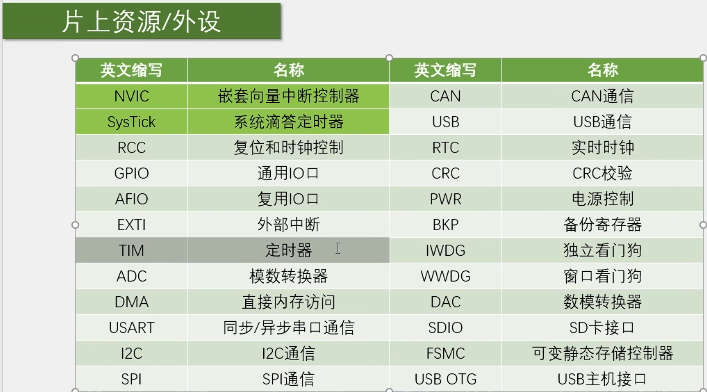
stm32F1的所有外设
约定成俗的杜邦线:黑色接地(gnd),红色接vcc,黄或橙接时钟,蓝色或绿色接数据线,白色或灰色或紫色接控制线或其他线
GPIO输出
GPIO介绍
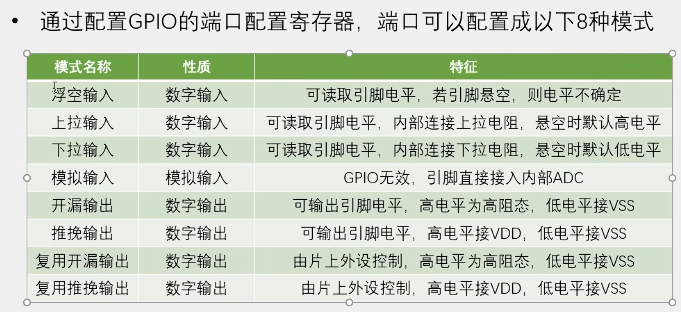
在STM32中I/O引脚,又称GPIO,可以被软件设置成各种不同的功能及模式。
分为输入(4 种)和输出 / 复用(4 种)两大类,核心区别是引脚是否主动输出电平、是否由外设复用;
GPIO相关寄存器配置
调用库函数来配置寄存器,可以脱离底层寄存器操作,使得开发效率提高,同时易于阅读和维护。GPIO相关的函数和定义分布在固件库文件stm32f10x_gpio.c和头文件stm32f10x_gpio.h中。
GPIO——IniTypeDef结构体的定义:1
2
3
4
5
6
7typedef struct
{
unit16_t GPIO_Pin; //GPIO引脚
GPIOMode_TypeDef GPIO_Mode; //GPIO模式
GPIOSpeed_TypeDef GPIO_speed; //GPIO速度
}
八个模式1
2
3
4
5
6
7
8
9
10
11typedef enum
{ GPIO_Mode_AIN = 0x0,//模拟输入模式
GPIO_Mode_IN_FLOATING = 0x04,//浮空输入模式
GPIO_Mode_IPD = 0x28,//下拉输入模式
GPIO_Mode_IPU = 0x48,//上拉输入模式
GPIO_Mode_Out_OD = 0x14,//开漏输出模式
GPIO_Mode_Out_PP = 0x10,//推挽输出模式
GPIO_Mode_AF_OD = 0x1C,//复用功能开漏输出
GPIO_Mode_AF_PP = 0x18//复用功能推挽输出
}GPIOMode_TypeDef;
OLED
串口调试:通过串口通信,将调试信息发送到电脑端,电脑使用串口助手显示调试信息
显示屏调试:直接将显示屏连接到单片机,将调试信息打印在显示屏上
Keli调试模式:借助Keli软件的调试模式,可使用单步运行,设置断点,查看寄存器及变量等功能
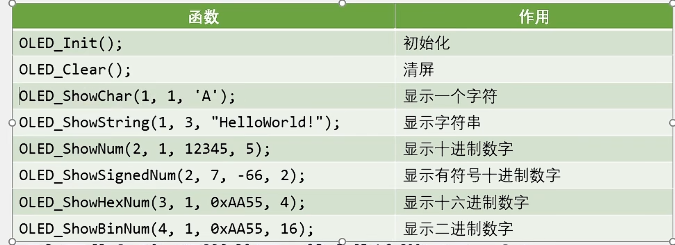
代码保存
点亮第一个led灯1
2
3
4
5
6
7
8
9
10
11
12
13
14
15
16
17
18
int main(void)
{
while(1)
{
RCC_APB2PeriphClockCmd(RCC_APB2Periph_GPIOA,ENABLE);//开启时钟
GPIO_InitTypeDef GPIO_InitStructure;
GPIO_InitStructure.GPIO_Mode=GPIO_Mode_Out_PP;
GPIO_InitStructure.GPIO_Pin=GPIO_Pin_0;
GPIO_InitStructure.GPIO_Speed=GPIO_Speed_50MHz;
GPIO_Init(GPIOA,&GPIO_InitStructure);//完成初始化
GPIO_ResetBits(GPIOA,GPIO_Pin_0);
}
}
led灯闪烁1
2
3
4
5
6
7
8
9
10
11
12
13
14
15
16
17
18
19
20
21
22
23
24
int main(void)
{
RCC_APB2PeriphClockCmd(RCC_APB2Periph_GPIOA,ENABLE);//开启时钟
GPIO_InitTypeDef GPIO_InitStructure;
GPIO_InitStructure.GPIO_Mode=GPIO_Mode_Out_PP;
GPIO_InitStructure.GPIO_Pin=GPIO_Pin_0;
GPIO_InitStructure.GPIO_Speed=GPIO_Speed_50MHz;
GPIO_Init(GPIOA,&GPIO_InitStructure);//完成初始化
GPIO_WriteBit(GPIOA,GPIO_Pin_0,Bit_RESET);
while(1)
{
GPIO_WriteBit(GPIOA,GPIO_Pin_0,Bit_RESET);
Delay_ms(500);
GPIO_WriteBit(GPIOA,GPIO_Pin_0,Bit_SET);
Delay_ms(500);
}
}
led流水灯
1 |
|
蜂鸣器1
2
3
4
5
6
7
8
9
10
11
12
13
14
15
16
17
18
19
20
21
22
23
24
25
26
27
28
int main(void)
{
RCC_APB2PeriphClockCmd(RCC_APB2Periph_GPIOB,ENABLE);//开启时钟
GPIO_InitTypeDef GPIO_InitStructure;
GPIO_InitStructure.GPIO_Mode=GPIO_Mode_Out_PP;
GPIO_InitStructure.GPIO_Pin=GPIO_Pin_12;
GPIO_InitStructure.GPIO_Speed=GPIO_Speed_50MHz;
GPIO_Init(GPIOB,&GPIO_InitStructure);//完成初始化
while(1)
{
GPIO_ResetBits(GPIOB,GPIO_Pin_12);
Delay_ms(500);
GPIO_SetBits(GPIOB,GPIO_Pin_12);
Delay_ms(500);
}
}
按键控制led
1 |
|
独立按键控制led1
2
3
4
5
6
7
8
9
10
11
12
13
14
15
16
17
18
19
20
21
22
23
24
25
26
27
28
29
30
31
32
33
34
35
36
37
38
39
40
41
42
43
44
45
46
47
48
49
50
51
52
53
54
55
56
57
58
59
60
61
62
63
64
65
66
67
68
uint8_t KeyNum;
int main(void)
{
LED_Init();
Key_Init();
while(1)
{
KeyNum=Key_GetNum();
if(KeyNum==1)
{
LED1_Turn();
}
if(KeyNum==2)
{
LED2_Turn();
}
}
void Key_Init(void)
{
RCC_APB2PeriphClockCmd(RCC_APB2Periph_GPIOB,ENABLE);
GPIO_InitTypeDef GPIO_InitStructure;
GPIO_InitStructure.GPIO_Mode= GPIO_Mode_IPU;
GPIO_InitStructure.GPIO_Pin= GPIO_Pin_1 | GPIO_Pin_11;
GPIO_InitStructure.GPIO_Speed= GPIO_Speed_50MHz;\
GPIO_Init(GPIOB,&GPIO_InitStructure);
}
uint8_t Key_GetNum(void)
{
uint8_t KeyNum=0;
if (GPIO_ReadInputDataBit(GPIOB,GPIO_Pin_1)==0)
{
Delay_ms(20);
while(GPIO_ReadInputDataBit(GPIOB,GPIO_Pin_1)==0);
Delay_ms(20);
KeyNum=1;
}
if (GPIO_ReadInputDataBit(GPIOB,GPIO_Pin_11)==0)
{
Delay_ms(20);
while(GPIO_ReadInputDataBit(GPIOB,GPIO_Pin_1)==0);
Delay_ms(20);
KeyNum=2;
}
return KeyNum;
}
}
光敏传感器连传感器1
2
3
4
5
6
7
8
9
10
11
12
13
14
15
16
17
18
19
20
21
22
23
24
25
26
27
28
29
30
31
32
33
34
35
36
37
38
39
40
41
42
43
44
45
46
47
48
uint8_t KeyNum;
int main(void)
{
BUZZER_Init();
LightSensor_Init();
while(1)
{
if(LightSensor_Get()==1)
{
BUZZER1_ON();
}
else
{
BUZZER1_OFF();
}
}
}
void LightSensor_Init()
{
RCC_APB2PeriphClockCmd(RCC_APB2Periph_GPIOB,ENABLE);
GPIO_InitTypeDef GPIO_InitStructure;
GPIO_InitStructure.GPIO_Mode= GPIO_Mode_IPU;
GPIO_InitStructure.GPIO_Pin= GPIO_Pin_13;
GPIO_InitStructure.GPIO_Speed= GPIO_Speed_50MHz;
GPIO_Init(GPIOB,&GPIO_InitStructure);
GPIO_SetBits(GPIOB,GPIO_Pin_13);
}
uint8_t LightSensor_Get(void)
{
return GPIO_ReadInputDataBit(GPIOB,GPIO_Pin_13);
}